

Garmin is rolling out a major new software update for several of its popular cycling computers. Firmware version 33.22 is now arriving as a stable release for the Edge 1050, Edge 850, Edge 550, and Edge MTB models.
New Tools Borrowed from the Edge 1060
The highlight of this release is the arrival of four big features originally introduced on the flagship Edge 1060. Riders on older models now get access to Garmin Messenger, which lets them send and receive messages right from their handlebars.
GroupRide is also included, making it easier to stay connected and share live locations with friends during group outings. On top of that, cyclists can now use Alternate Datafields to customize their screens more easily and follow structured training plans with the new Garmin Cycling Coach.
Smoother Payments and Better Battery Life
Garmin has also focused on making everyday riding much less frustrating. Users who rely on Garmin Pay for mid-ride coffee stops will notice fewer interruptions during checkout.
More importantly, the update fixes a major bug that was draining the battery while the bike computer was sitting idle. Riders doing ultra-endurance events will also be happy to hear that LiveTrack sessions no longer cut off automatically after 24 hours.
Key Bug Fixes for Sensors and Accessories
Several annoying glitches involving third-party apps and bike accessories have been cleared up in version 33.22:
-
Connect IQ stability: GPS tracking and connected bike lights will no longer turn off when you open a Connect IQ app.
-
E-bike accuracy: Cyclists using a Bosch Smart System will no longer see strange cadence spikes when pedaling backward.
-
Radar and gear tracking: The update repairs the Varia Vue On Radar Activity recording mode and ensures your gear mileage tracks properly.
-
Safety alerts: The “Find My Edge” alarm can no longer be accidentally muted, making it easier to locate a lost device.
Interface Tweaks and System Reliability
A few visual and setup bugs have been squashed as well. Home screen icons that previously went missing are back, and Garmin Coach will now appear properly on the main screen instead of only suggesting rest days.
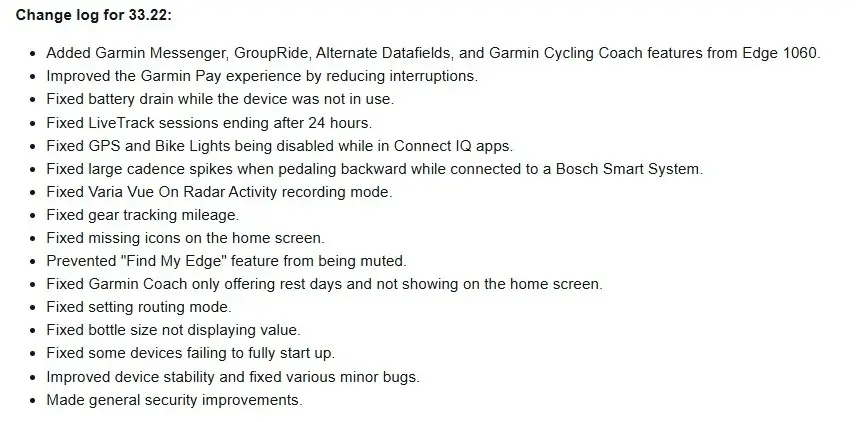
The update also fixes issues with selecting routing modes, ensures bottle sizes display their actual values, and resolves a startup bug that kept some units from booting up completely. General security patches and under-the-hood stability improvements round out the release. See the change log summary in the picture below!
How to Install the Update
To grab the new software, make sure your Edge computer is connected to a saved Wi-Fi network. Open the Main Menu, tap on System, select About, and then choose Check for Updates to start the download.
Also Read: Garmin Early Black Friday Sale: Best Deals on Fenix 8, Forerunner 965, and More (Up to 44% Off)

