

Garmin has officially started sending out a major new software update, version 24.20, to several of its top smartwatches. This public release arrives after the company spent weeks testing more than five beta versions, moving from version 24.12 through 24.16.
The update is now available for the Fenix 8, Fenix 8 Pro, Fenix E, Quatix 8, Tactix 8, and Enduro 3. Alongside a long list of bug fixes, the new firmware brings fresh tools for pet owners, cyclists, and walkers.
New Features for Pets, Walkers, and Cyclists
One of the biggest additions in version 24.20 is built specifically for people who exercise with their dogs. Users can now set up dedicated dog profiles right on their watches, track specific pet activities, review related data, and earn new dog-themed badges.
The update also expands training and navigation tools for everyday athletes:
-
Cycling Coaching: Beginner and casual riders now have access to guided Garmin Coach workouts to help build their fitness.
-
Better Walking Maps: Walk activities now feature a cleaner, easier-to-read map layout.
-
Smarter Alerts: During workouts, Auto Lap alerts will now read out the exact lap number. Meanwhile, daily move alerts can now be manually snoozed, and the watch will automatically hold them back during certain times.
Smoother Workouts and Fewer Interruptions
Garmin also made several tweaks to keep the watch from getting in the way during a tough session. If you are in the middle of a high-intensity interval, the watch will now hold onto incoming notifications and deliver them later so you do not lose focus.
To help prevent accidental data loss, Garmin changed how the watch handles discarding activities that last longer than 30 seconds. Navigating the pause screen is also faster, as users can now scroll continuously through the menu list to quickly reach the “Resume” button.
Important Bug Fixes
A large portion of version 24.20 focuses on fixing frustrating glitches reported during recent testing. Key repairs include:
-
Race Crashes: Fixed a serious bug that could cause the watch to completely restart right after crossing a half-marathon timing mat.
-
Golf and Navigation: Resolved an issue that caused the screen to freeze during golf rounds, as well as a glitch that left the watch stuck on a “Searching” screen if a navigation route failed.
-
Battery and Sound: Fixed a bug where Expedition mode failed to turn off Bluetooth to save power, and stopped timers or alert tones from ringing while Sleep Mode or Do Not Disturb was active.
-
General Polish: Updated various language translations and squashed several other minor software bugs.
How to Get the Update
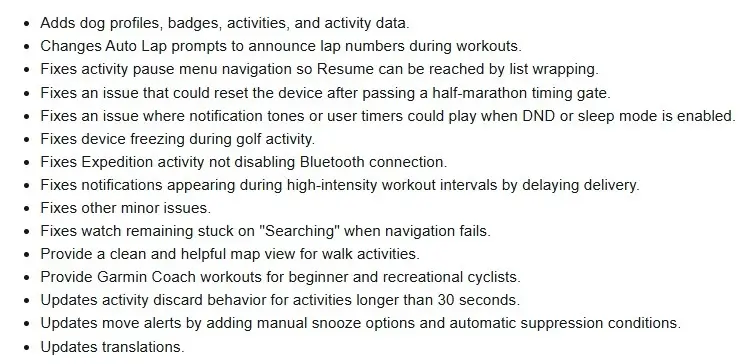
Because Garmin rolls out new software in waves, it may take a few days to reach every watch automatically. However, owners can check for it right away on their device by opening the Main Menu, going to Settings, selecting System, tapping Software Update, and hitting Check For Updates. You can see the change log summary in the picture below!
Also Read: Garmin Early Black Friday Sale: Best Deals on Fenix 8, Forerunner 965, and More (Up to 44% Off)

