

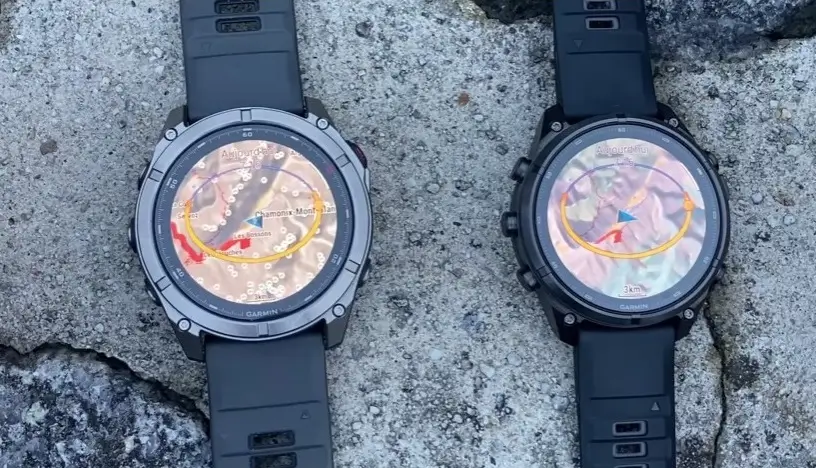
In a recent head-to-head speed test, Jérôme from Blog Montre cardio GPS put the Garmin Fenix 9 Pro and the Fenix 8 Pro through a series of hands-on trials to answer one core question: Is Garmin’s newest flagship actually faster than its predecessor?
Rather than relying purely on paper specs, the review puts both watches side-by-side across everyday menu navigation, route loading, map zooming, weather layer rendering, and activity saving. Surprisingly, the test reveals that while the Fenix 9 Pro claims the lead in several high-demand graphics scenarios, the older Fenix 8 Pro actually wins or ties in a few unexpected areas.
Here is a full breakdown of every test performed in the review. And don’t forget to watch the video below to see the watches running side-by-side in real time
1. Daily Interface & Route Calculation: A Dead Heat
Jérôme kicked off the comparison by testing basic user interface interactions, like scrolling through system menus and using touchscreen navigation. Side-by-side, both smartwatches responded virtually identically. Swiping between screens and opening basic widgets showed no noticeable performance gap between the two generations.
When loading a pre-planned navigation route (an operation that often causes minor hangs on older wearables), both watches calculated and prepared the course at almost the same speed. For basic operating system tasks and route loading, the upgraded processor on the Fenix 9 Pro provides no major leap forward.
2. Standard TopoActive Map Zooming & Panning: Fenix 9 Pro Wins
Moving on to Garmin’s native TopoActive maps, Jérôme aligned both devices to the same zoom level and North-up orientation to test rendering speeds.
-
Zooming In & Out: The Fenix 9 Pro demonstrated a clear advantage when stepping through zoom levels. Zooming in was visibly snappier, while zooming out—a task that forces the watch to render large map tiles simultaneously—was significantly faster on the Fenix 9 Pro.
-
Panning Across Terrain: Small, incremental map movements were nearly instantaneous on the Fenix 9 Pro. Panning rapidly across large distances was also smoother, as the new hardware pre-loads surrounding map tiles much more effectively.
3. Weather Maps, Shaded Relief & Large De-zooming: Fenix 8 Pro Fights Back
Interestingly, the test revealed several complex mapping scenarios where the older Fenix 8 Pro actually outperformed the Fenix 9 Pro:
-
Solar & Widget Map Finalization: When launching the sunlight/brightness widget overlay, the Fenix 9 Pro displayed the base map graphic first, but the Fenix 8 Pro finished rendering the complete visual elements faster.
-
Large De-zoom Action: Performing a massive, rapid zoom-out to view a wider geographical area rendered faster on the Fenix 8 Pro, whereas the Fenix 9 Pro took longer to fill in the zoomed-out map portion.
-
Shaded Relief (Relief Ombré): Turning on terrain hill-shading revealed interesting results. The Fenix 8 Pro brought up the initial shaded layer faster. However, once enabled, panning across mountain ridges was vastly superior on the Fenix 9 Pro, while the Fenix 8 Pro struggled with redraw lag.
-
Weather Overlays: Loading live weather layer maps (such as wind vector overlays) showed only a tiny lag on the Fenix 8 Pro, making both watches roughly equal for weather checks.
4. Saving Activities & Stat Processing
Saving a workout is a common pain point for athletes when tracking long sessions. Jérôme recorded a short 7-minute activity on both watches to compare processing times:
-
Stopping & Saving: Both units took the same time to halt the activity timer and write the initial file.
-
Stat Summaries: When compiling and presenting post-workout summary statistics, the Fenix 8 Pro actually loaded the summary stats screen faster than the Fenix 9 Pro.
(As an interesting aside during this test, Jérôme pointed out how subtle GPS drift accumulates even while stationary—showing 40m recorded on one watch and 90m on the other while sitting still, recalling a past test where a stationary watch accumulated over 40 km over a weekend.)
5. Third-Party Maps (Alexis MapRando): Detail vs. Speed
For the final test, Jérôme loaded MapRando (Alexis’s hiking maps)—a popular third-party map layer he uses frequently for outdoor trail navigation.
-
Visual Fidelity: Before testing speed, Jérôme highlighted a major visual difference: at a 2 km zoom level, the Fenix 9 Pro renders significantly finer detail. Streets and trail vectors were sharply defined in town centers like Chamonix, whereas the Fenix 8 Pro displayed a coarse gray cluster.
-
Rendering Speed: Because the Fenix 9 Pro renders a far higher level of graphical detail on third-party maps, its initial zoom-in step was actually slower than on the Fenix 8 Pro.
-
Pre-cached Tile Advantage: However, once zoomed in, small panning movements and double-step zoom-outs were noticeably smoother on the Fenix 9 Pro. Thanks to its upgraded map engine and extra memory, the Fenix 9 Pro pre-caches surrounding map tiles, allowing athletes to navigate dense custom maps without constant screen redraws.
The Verdict: Summary of the Comparison
According to Blog Montre cardio GPS, the Fenix 9 Pro is not a simple, across-the-board blowout over the Fenix 8 Pro:
| Feature / Task | Faster Device | Notes from Review |
| System Menus & Touch | Tie | Identical responsiveness in everyday swiping. |
| Route Calculation | Tie | Loads courses at virtually the same rate. |
| TopoActive Map Panning | Fenix 9 Pro | Pre-loaded tiles make small movements instant. |
| Standard Map Zooming | Fenix 9 Pro | Noticeably faster stepping through zoom levels. |
| Massive Zoom-Out | Fenix 8 Pro | Renders wide-area views faster than Fenix 9 Pro. |
| Shaded Relief Activation | Fenix 8 Pro | Initial layer toggles faster on Fenix 8 Pro. |
| Shaded Relief Panning | Fenix 9 Pro | Far smoother when sliding across mountain ridges. |
| Activity Stat Loading | Fenix 8 Pro | Pulls up post-run summary stats slightly quicker. |
| 3rd-Party Map Details | Fenix 9 Pro | Shows finer details, though takes longer on initial render. |
Although the Fenix 9 Pro looks faster in some specific areas—like map panning and rendering fine trail details—the overall performance jump is far from night and day. Daily navigation, menu scrolling, activity saving, and route calculations remain virtually identical between the two generations, with the Fenix 8 Pro even taking the win in a few rendering tasks.
If you are currently a Fenix 8 Pro user and are considering upgrading purely for speed and system responsiveness, I don’t see it as a strong enough reason to make the jump.
Also Read: Garmin Fenix 9 vs. Fenix 8 (And Pro Models): Every New Upgrade Explained

