

If your Venu 4 has been resetting in the middle of a run or freezing up over morning notifications, relief is finally on the way. Garmin is officially rolling out beta update version 18.23, a patch packed with targeted bug fixes designed to make the smartwatch run much more reliably.
Major Fixes for Workouts and Crashes
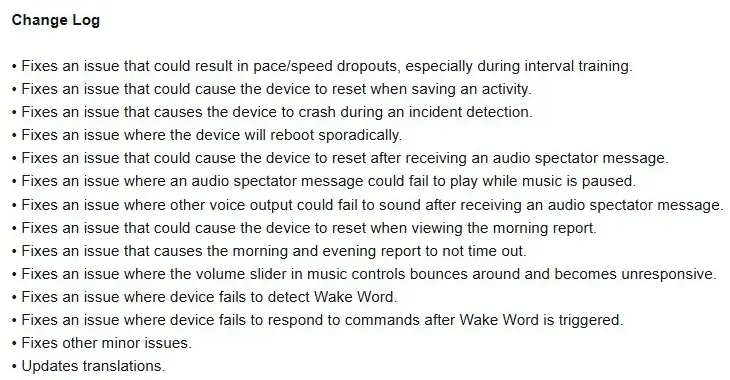
One of the biggest improvements in this release addresses tracking errors during workouts. Garmin fixed a glitch that caused pace and speed data to suddenly drop out, which was particularly annoying for users doing high-intensity interval training.
The update also solves several serious system crashes. Previously, the Venu 4 could randomly restart when saving an activity, viewing the Morning Report, or triggering the built-in incident detection feature. Random, unexplained reboots should now be a thing of the past.
Audio and Spectator Message Upgrades
Garmin spent a lot of time cleaning up audio bugs in version 18.23. Before this patch, receiving an audio spectator message could cause the device to crash or prevent subsequent voice notifications from playing. The update also fixes an issue where these spectator messages failed to play if your music was paused.
Additionally, the volume slider in the music player has been repaired. Users reported that the slider would jump around or stop responding entirely, but it should now slide smoothly.
Voice Command and Display Tweaks
If you rely on voice controls, this build fixes two major voice assistant bugs. The watch should no longer fail to detect its designated “Wake Word,” and it won’t ignore your spoken commands after waking up.
Garmin also fixed a bug where Morning and Evening reports would stay stuck on the screen instead of automatically timing out. On top of these changes, the update includes minor bug fixes and updated language translations across the system.
How to Get Update 18.23
If you are enrolled in Garmin’s Beta Program, you don’t have to wait for the automatic push. You can manually trigger the download right now directly from your watch.
Simply head to the Main Menu, tap Settings, scroll down to System, select Software Update, and press Check For Updates.
Also Read: Garmin Teases New Outdoor Watches for Late 2026 as Fitness Sales Boom

